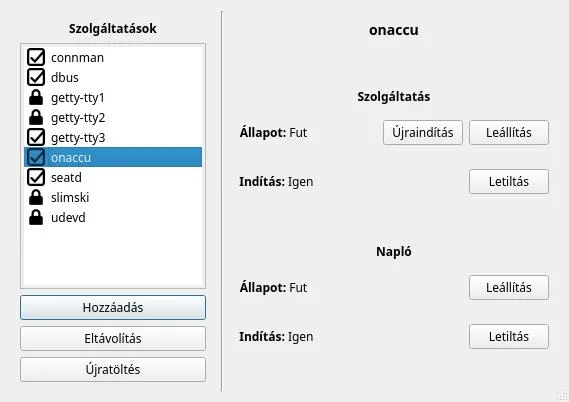
A következő megoldás a már telepített clamav, clamav-daemon és freshclam valamint olyan kernelhez amely konfigurálva és fordítva volt engedélyezve a FANOTIFY -t!
clamd.conf kijelölése és az /etc/clamav/ mappába helyezése.
kijelölés: clamd.conf
#Automatically Generated by clamav-daemon postinst
#To reconfigure clamd run #dpkg-reconfigure clamav-daemon
#Please read /usr/share/doc/clamav-daemon/README.Debian.gz for details
LocalSocket /var/run/clamav/clamd.ctl
FixStaleSocket true
LocalSocketGroup root
LocalSocketMode 666
# TemporaryDirectory is not set to its default /tmp here to make overriding
# the default with environment variables TMPDIR/TMP/TEMP possible
User root
ExcludePath ^/dev/
ExcludePath ^/run/
ExcludePath ^/sys/
ExcludePath ^/proc/
ScanMail true
ScanArchive true
ArchiveBlockEncrypted false
MaxDirectoryRecursion 15
FollowDirectorySymlinks false
FollowFileSymlinks false
ReadTimeout 180
MaxThreads 12
MaxConnectionQueueLength 15
LogSyslog false
LogRotate true
LogFacility LOG_LOCAL6
LogClean false
LogVerbose false
PreludeEnable no
PreludeAnalyzerName ClamAV
DatabaseDirectory /var/lib/clamav
OfficialDatabaseOnly false
SelfCheck 3600
Foreground false
Debug false
ScanPE true
MaxEmbeddedPE 10M
ScanOLE2 true
ScanPDF true
ScanHTML true
MaxHTMLNormalize 10M
MaxHTMLNoTags 2M
MaxScriptNormalize 5M
MaxZipTypeRcg 1M
ScanSWF true
ExitOnOOM false
LeaveTemporaryFiles false
AlgorithmicDetection true
ScanELF true
IdleTimeout 30
CrossFilesystems true
PhishingSignatures true
PhishingScanURLs true
PhishingAlwaysBlockSSLMismatch false
PhishingAlwaysBlockCloak false
PartitionIntersection false
DetectPUA false
ScanPartialMessages false
HeuristicScanPrecedence false
StructuredDataDetection false
CommandReadTimeout 30
SendBufTimeout 200
MaxQueue 100
ExtendedDetectionInfo true
OLE2BlockMacros false
AllowAllMatchScan true
ForceToDisk false
DisableCertCheck false
DisableCache false
MaxScanTime 120000
MaxScanSize 100M
MaxFileSize 25M
MaxRecursion 16
MaxFiles 10000
MaxPartitions 50
MaxIconsPE 100
PCREMatchLimit 10000
PCRERecMatchLimit 5000
PCREMaxFileSize 25M
ScanXMLDOCS true
ScanHWP3 true
MaxRecHWP3 16
StreamMaxLength 25M
LogFile /var/log/clamav/clamav.log
LogTime true
LogFileUnlock false
LogFileMaxSize 0
Bytecode true
BytecodeSecurity TrustSigned
BytecodeTimeout 60000

OnAccessMaxFileSize 500M
OnAccessMountPath /

OnAccessExcludeRootUID true
OnAccessExcludeUID 0
OnAccessExcludePath ^/proc/
OnAccessExcludePath ^/run/
OnAccessExcludePath ^/sys/
OnAccessExcludePath ^/dev/

#OnAccessIncludePath /root
OnAccessIncludePath /home
OnAccessPrevention true
OnAccessExtraScanning true
#VirusEvent /etc/clamav/clami.sh
Helyezd az onacc szkriptet az /etc/init.d/ könyvtárba. Majd hozd létre a /root/quarantine könyvtárat root jogkörű Thunar -ral!
onacc:
#!/bin/bash
### BEGIN INIT INFO
# Provides:          onacc
# Required-Start:
# Required-Stop:
# Should-Start:      glibc
# Default-Start:     S
# Default-Stop:
# Short-Description: Set hostname based on /etc/hostname
# Description:       Read the machines hostname from /etc/hostname, and
#                    update the kernel value with this value.
### END INIT INFO


do_start () {

if [[ "$(pidof clamd)" == "" ]];then

echo "nincs clamd" ; sleep 300 && /sbin/clamonacc -F --log=/var/log/clamav/clamonacc.log --move=/root/quarantine &
echo "clamd clamonacc rohangal"
else

/sbin/clamonacc -F --log=/var/log/clamav/clamonacc.log --move=/root/quarantine &
echo "clamd fut onacc fut"

fi


}

case "$1" in
  start|"")
    do_start
    ;;
  restart|reload|force-reload)
    echo "Error: argument '$1' not supported" >&2
    exit 3
    ;;
  stop)
    killall clamonacc
    ;;
  status)
    exit 0
    ;;
  *)
    echo "Usage: onacc [start|stop]" >&2
    exit 3
    ;;
esac


exit 0
Ezek után alkalmazzuk az onacc -ot, hogy lefusson rendszerindításnál:
sudo update-rc.d onacc defaults
Shell szkript futtatás engedélyezése dupla klikkre Thunar fájlkezelőben:
xfconf-query --channel thunar --property /misc-exec-shell-scripts-by-default --create --type bool --set true
És végül a clami.sh szkript ha a karanténba mozgatás nem működne valamiért, (ne felejtsd el kivenni a komment jelet az utolsó sorból a clamd.conf -ban ha akarod használni!):
Majd helyezd a sorban definiált mappába a szkriptet!
clami.sh:
#!/bin/bash
getta=""
getta="/var/log/clamav/clamscan_szatyor.log"
szatyor=""
szatyor="$HOME/filelist.txt"
szatyorba=""
szatyorba="$HOME/filelist_uniq.txt"
gedda=""
gedda="$HOME/viruses"


if [[ -f "$szatyor" ]];then
rm "$szatyor" && echo "$szatyor removed"
else
echo "$szatyor was not exist"
fi
if [[ -f "$szatyorba" ]];then
rm "$szatyorba" && echo "$szatyorba removed"
else
echo "$szatyorba was not exist"
fi
if [[ -f "$getta" ]]; then

rm "$getta"
echo "$getta deleted!"
fi
if [[ ! -d "$gedda" ]]; then

mkdir -p "$gedda"
echo "$gedda created folder"
fi

for pid in `ps auxwww | awk '{print $2}'`; do readlink -f /proc/$pid/exe | awk '{print $1}' >> "$szatyor"; done


cat "$szatyor" | sort | uniq > "$szatyorba"
echo "Number of unique Executables in Memory: "
wc -l "$szatyorba"

echo "starting scan" && clamdscan -i -m --file-list="$szatyorba" --log="$getta"

echo "Complete!"
jelez=""
jelez="$(cat $getta | grep "Infected" | sort -r | head -n1 | cut -d":" -f2 | cut -f2 -d" ")"

cselez=""
cselez="$(cat $getta | grep "FOUND" | cut -d":" -f1 | sort | uniq)"

##cp /home/username/.Xauthority /root/.Xauthority
###export DISPLAY=":0.0"

if [[ "$jelez" > "0" ]]; then


#xmessage -title "infected processes" "Infected file(s), running process(es) found !!!


#" &

printf "$cselez" | xargs killall -s9 &
tesztelek=$!
wait "$tesztelek"
#xmessage -title "KILLED" "

#ALL infected processes killed !!!
#" &
printf "$cselez" | xargs -I {} mv {} "$gedda" &

#xmessage -title "MOVED" "

#ALL infected processes moved to $gedda !!!
#" &


else
echo "OK"

fi
A végén ne felejtsd el beállítani a szükséges jogosultságokat!
A korábban ígért másik indítás inithez:
onaccu:
#!/bin/bash
### BEGIN INIT INFO
# Provides:          onaccu
# Required-Start:
# Required-Stop:
# Should-Start:      glibc
# Default-Start:     S
# Default-Stop:
# Short-Description: Set hostname based on /etc/hostname
# Description:       Read the machines hostname from /etc/hostname, and
#                    update the kernel value with this value.
### END INIT INFO


do_start () {

/sbin/startclamonacc &


}

case "$1" in
  start|"")
    do_start
    ;;
  restart|reload|force-reload)
    echo "Error: argument '$1' not supported" >&2
    exit 3
    ;;
  stop)
    killall clamonacc; kill -9 "$(cat /tmp/clamonacc_starter_loop.txt)"
    ;;
  status)
    exit 0
    ;;
  *)
    echo "Usage: onaccu [start|stop]" >&2
    exit 3
    ;;
esac


exit 0
startclamonacc:
#!/bin/bash

while [ "$(pidof clamonacc)" == "" ];do

sleep 10
[[ ! -z "$(pidof clamd)" ]] && /sbin/clamonacc -F --log=/var/log/clamav/clamonacc.log --move=/root/quarantine &

echo $$ > /tmp/clamonacc_starter_loop.txt
done

rm -f /tmp/clamonacc_starter_loop.txt &

exit 0